Nothing here is special to that shop. The same checks and rewrites apply to any store, on Shopify, Wix or anything else, because they are about what Google and shoppers need to see.
What happened on our store
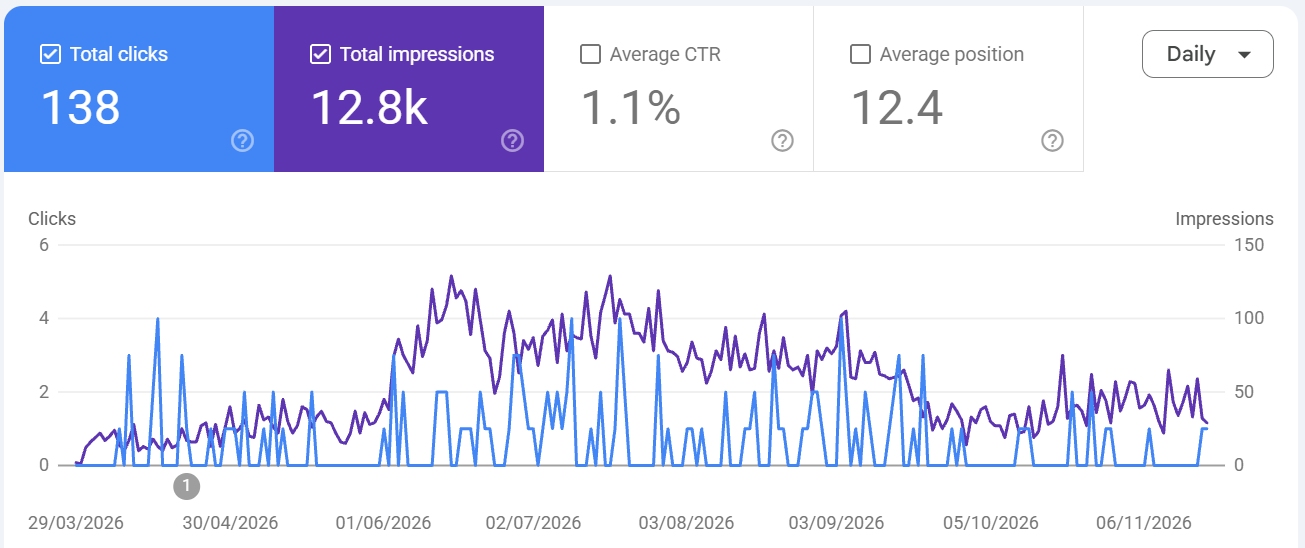
This is the store's Google Search Console from late March to mid November 2026. The purple line is impressions (how often the store appeared in Google), the blue line is clicks.
These are natural (organic) search results only, not paid advertising. Search Console counts only the free listings in Google's results; paid ads are never included in these numbers. Every impression and click in this chart was earned, not bought. We stopped all paid advertising on the store in October 2026.
- April: the store showed up about 10 to 25 times a day.
- May and June: we ran the checks and rewrites below across the store: a strict compliance check, answer-first rewrites of the key pages, FAQs and structured data.
- Mid June: impressions passed 100 a day, roughly four to five times April, and held there through the summer.
- Rankings: comparing April with June, the cricket gift ideas post moved from around position 37 to 8.2, and the best gifts for a cricket coach post from around 16 to 9.5.
- Google Merchant Center: the store's suspension was cleared. We were refused four times before we found every cause ourselves. That story is in How I cleared my own Merchant Center suspension.
The work was done with the same checks that are now in our skills packs, run one prompt at a time.
The honest parts:
- Clicks didn't rise as fast as impressions. Over the whole period the store averaged about 1% click-through. Pages moved from page 3 onto pages 1 and 2, so they showed for many more searches where they weren't yet in the top three. Rankings alone don't pay the bills; titles and offers still have to earn the click.
- From October, impressions eased back to around 30 to 50 a day. The store sells cricket clothing, and the UK cricket season ends in September, so fewer people are searching for cricket gifts and shirts in autumn. We had also stopped new work on the store by then. We're watching it, and we'll compare next spring with this one. If your products are seasonal, judge changes against the same time last year, not last month.
- A rising line after a change suggests the change helped. It doesn't prove it on its own, because Google is always moving too. We judge a change about six days after it's live and indexed, then again after a month.
Then we tried it on a second, dormant site
One store could be luck, so we applied the same methods to another of the sites we maintain and manage, in a completely different niche. It had been live for months, but we hadn't worked on it or reviewed it in any real way until November. It was ticking over and nothing more.
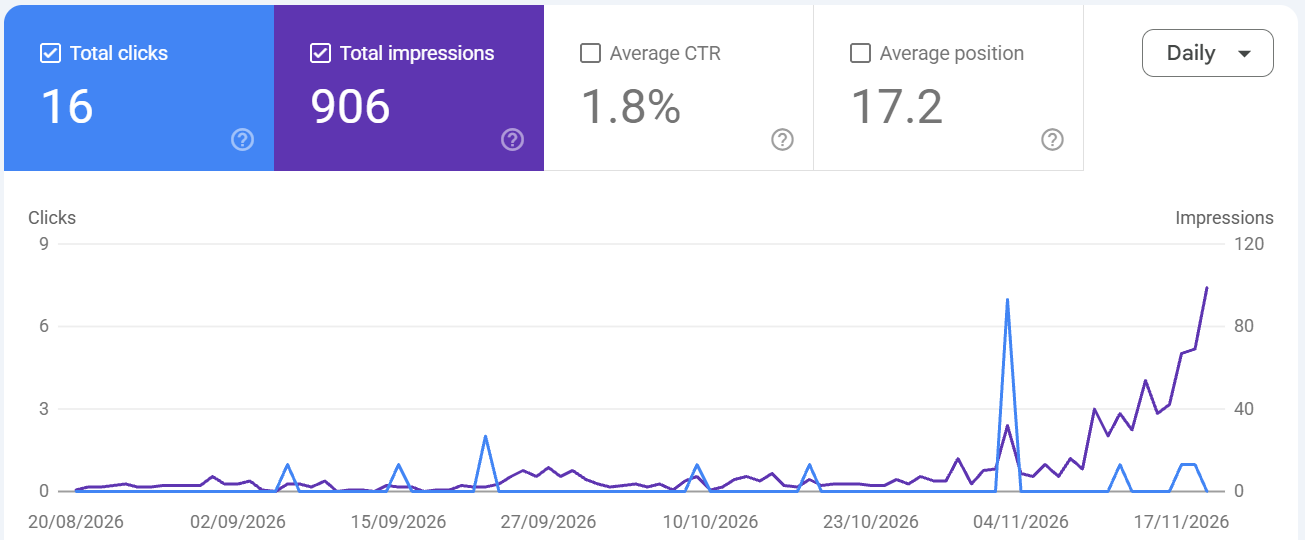
- September and October: the site showed up in Google only a handful of times a day.
- November: we ran the same checks and rewrites: pages rebuilt around the questions people actually ask, answers first, FAQs, links between related pages, and an indexing check after every change.
- By 19 November: impressions had climbed to around 100 a day, and still rising when we pulled the numbers.
- Over the three months: 906 impressions and 16 clicks, average position 17.2. Small numbers, but the shape of the line is the point: flat for two months, then up as soon as the work started.
Again, organic results only, no paid ads. And again the honest caveat: this is three weeks of a rising line, not a year. We'll keep watching it and update this post.
What we did, step by step
These are the eight steps we took, in order, on every site. The exact prompts we used for each one are in the SEO Intel Skills and Prompt Pack, and the skills packs run the checks across a whole store in one go. Our free prompts page has a starter set if you want to try the approach first.
1. Find what Google sees on your shop
What it moved: this is the type of check that found the causes of our store's Merchant Center suspension: missing contact details, policy gaps, placeholder text and claims Google couldn't verify.
2. Rewrite a page so it answers first
What it moved: this is the approach behind the ranking jumps on our store's blog posts (position 37 to 8.2 on one).
3. Add an FAQ from real questions
What it moved: FAQs and structured data went in alongside the rewrites in prompt 2. We can't separate their effect from the rest of the rewrite, so treat this as part of prompt 2, not a magic trick on its own.
4. Find the searches you nearly rank for
What it moved: on our store it showed that "cricket coach gifts" was seen almost 300 times and "cricket t shirt" over 200 times in six months, with few or no clicks, and which pages sat just off page 1. That's where the next work goes. Export the Queries and Pages tables from Search Console first.
5. Fix titles that get seen but not clicked
What it moved: not proven yet. On our store, two blog posts reached positions 9.7 and 11 with 0 clicks. That's the problem this prompt fixes. We'll update this post with the result.
6. Find what people actually search for
What it moved: it tells you which words to use in headings and FAQs, so you write for what people actually type rather than guessing.
7. Link new pages from old ones
What it moved: new pages that are linked from existing pages get found and indexed faster. We do this on every new page.
8. Check it's indexed
What it moved: pages Google hasn't indexed can't rank. After every publish we check, and ask Google to index new pages.
The prompt behind all the others
None of these works well if the AI forgets what you did last week. A big improvement in our results came from setting AI up properly: project folders, a short memory file, a written method for repeat jobs and a decision log, so every session starts in the right place. The prompts for that are in How to use AI properly, and turning your best prompts into skills that keep improving is in What are Claude skills?.
What we'll do next
Seeing these results, we're now applying the same methods to all of our sites. We check each site's Search Console every month, and we'll update this post within three months, by the end of February 2027, with the results from every site: what moved, what didn't, and anything that went backwards. If a prompt here doesn't earn its place, it comes out.
Quick start
- Check your shop the way Google's reviewers do, and fix what you find.
- Rewrite your most important page so it answers first, and add FAQs.
- Once a month, look at Search Console for the searches you nearly rank for.
- After every publish, link the new page from old ones and check it's indexed.
- Write down what you changed and the date, and check the result six days later.
Sources and further reading
- Google Search Central Help: Performance report: What Search Console impressions, clicks and position mean.
- Google Search Central: FAQ structured data: Who sees FAQ rich results today.